DOOMcember

DOOMcember Multiplayer PVP Event
Hosted by CaptainPeelcard
Game
DOOM 2 Multiplayer (using Zandronum)
Description:
Join us for some casual fun PVP matches! We will host a call in the Retro Computer Events Discord for anyone who wants to join us to chat while we play.
Event Date:
Rules:
- Player Name: Use your Twitch username. Set it under Options > Player Setup inside the game.
- No voice modulation or changers in the Discord call; it is too distracting with a large group
- This is just casual PVP
Game Setup
- Install Zandronum 3.2.1 + DoomSeeker. You can directly download the Windows installer from here or find an installer for your OS on the main downloads page: https://zandronum.com/downloads/zandronum3.2.1-win64-installer.exe
- If you do not have DOOM 2, skip to step 4.
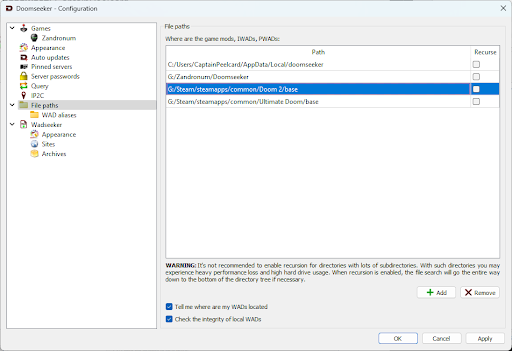
- Add the path of your DooM 2 install in Zandronum under Options > Configure (mine is pointed directly to my steam copy). Note it is best to use the Browser button or the game may fail to find and validate the WAD files.
- If you do not own DOOM 2, it’s really easy to grab FreeDOOM directly from Zandronum.
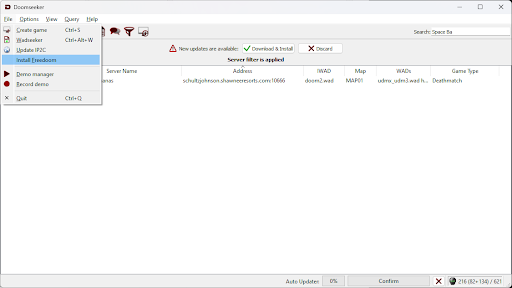
- You can download it before you try to connect. Go to File > Install Freedoom
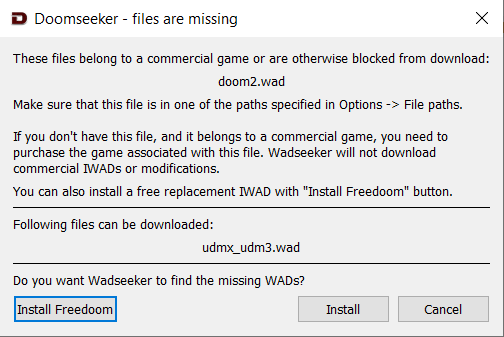
- Otherwise you will be prompted to download FreeDOOM when you connect to the server.
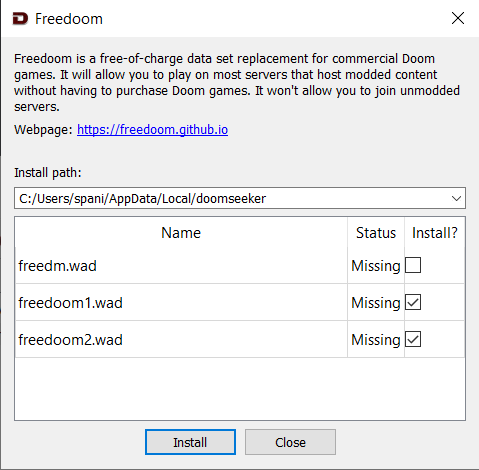
- You can download it before you try to connect. Go to File > Install Freedoom
- You will need to reconnect to the server one more time if you completed step 4b. This will grab any WADs the server is running.
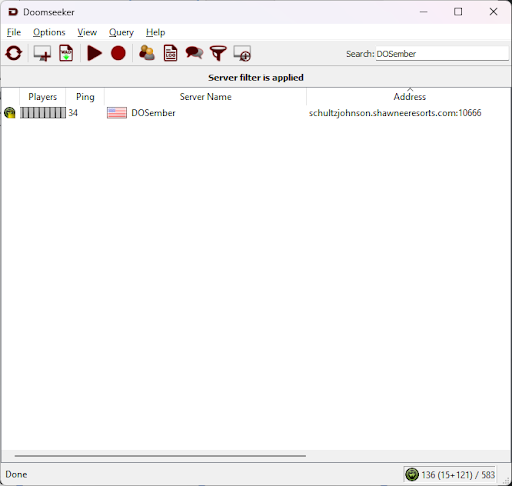
- Search for the server in the search box located at the upper right.
- Server Name: DOSember
- Password: Will be updated here at event start